Wiring help please??!!?

DevilDawg3097

New Member
Supporting Member
Joined
Jul 29, 2008
Messages
3,863
Reaction score
3
Location
Windy City
I haven't received my manual yet and I need help with where is the Tach signal wire (color or#) and the TPS signal wire I believe I know where this one is but I want to be absolutly positive before I wire things up. Any and all help will be gratfully appreciated.:burnout: :burnout:
 
DevilDawg3097 said:
I haven't received my manual yet and I need help with where is the Tach signal wire (color or#) and the TPS signal wire I believe I know where this one is but I want to be absolutly positive before I wire things up. Any and all help will be gratfully appreciated.:burnout: :burnout:

the tach wire for raptor shift lights & the TPS wires have alot of threads with pics that have been talked about many times..... use the search engine here on the forum..... ;)
 
I've checked under tech connect for the past hour checking for the tach wire, and it just leads back to the instrument cluster, but it does not specify wire or color from cluster.
 
Like moparracing said... Do a search.

If I remeber right it's Blue with a white stripe. I would go look for you but I don't have my truck with me.
 
I did do a search on the forum all the links were dead. and search on the internet to no avail. nothing specific for our trucks. I ordered the cd's for 04 chrysler service manual just haven't gottin it yet.
 
Step 1- Disconnect the negative battery cable
Step 2- Find a place to mount the light and run the wires.
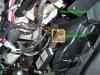
Step 3-Connect the black wire(ground) to a good ground, under the steering column on the right side is a good place (see pic)
step1.jpg
Step 4- Connect the red wire(12volt) to pink/yellow wire under dash left of clutch pedal, there are two pink/yellow wires you want the smaller one(see pic)
step2.jpg
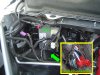
Step 5- For the green wire(tach signal) find your pcm (passenger side engine compartment) you want the black bottom connector(see pic). Connect the green wire to the dark blue/white wire these also work: dark blue/orange, dark blue/yellow, dark blue/dark green, or dark blue/tan
step3.jpg
Step 6-Set it for 2 cylinder mode and desired rpm you want
Step 7- Reinstall the negative battery cable to test it, if it works your done
 

Latest posts

Support Us

Become A Supporting Member Today!

Click Here For Details

Back
Top